

Skip to content
  •  6353 W Rogers Cir STE 3, Boca Raton, FL 33487
  •  (516) 752-8008
  •  support@setomaticsystems.com
Prespa light mode logo
  • Home
  • Guides
    • Registration
    • Bluetooth Pairing
    • EMV Impact Shield
    • Mobile Pay
  • POS Manual
    • Connect to the Internet
    • POS Tab
    • POS Reports Tab
  • Portal Manual
    • Dashboard
    • View
    • Issue Card
    • Reports
    • Manage
    • Clear Total
    • Kiosk
    • Registered Card
    • POS
    • POS Reports
  • Troubleshoot
    • Video: Service Guide

Guides

  • Registration
  • Bluetooth Hub
  • EMV Impact Shield
  • Mobile Pay

Portal Manual

  • Dashboard
  • View
  • Issue Card
  • Reports
  • Manage
  • Clear Total
  • Kiosk
  • Registered Card
  • POS
  • POS Reports

POS Manual

  • Connect to the Internet
View Categories
  • Home
  • Portal Manual
  • Clear Total
0:00 / 1:20
  • View as Markdown Open this page as plain Markdown (opens in a new tab)
  • Open in ChatGPT Ask questions about this page (opens in a new tab)
  • Open in Claude Ask questions about this page (opens in a new tab)
  • Open in Google AI Studio Ask questions about this page (Google account required) (opens in a new tab)

View Clear Total

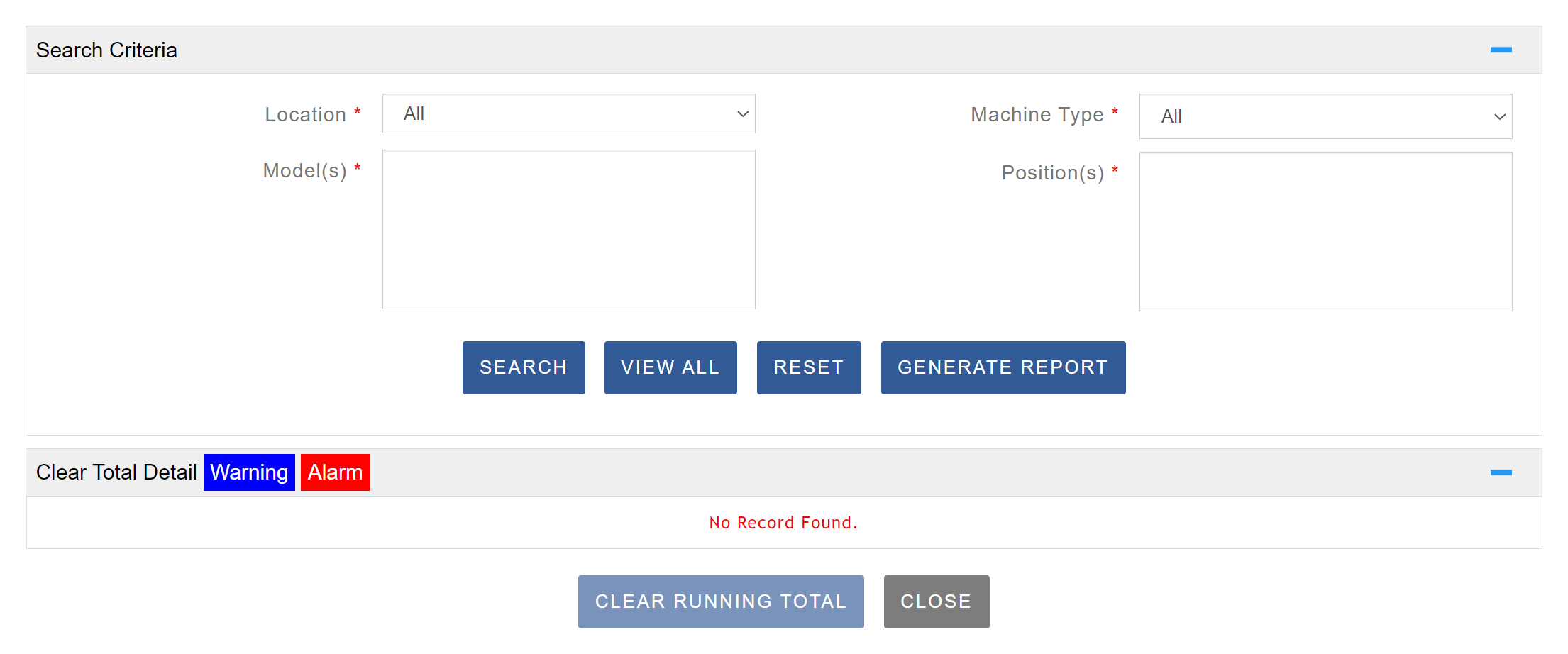
The Clear Running Totals page allows you to reset the accumulated totals for your coin boxes. Before clearing any totals, ensure that values have been added to your coin boxes as described in the Add Coin Box Values section. From this page, you can manage your alerts and reset the counters for individual machines as needed. The interface displays each machine’s current Running Total along with other related details. To clear totals, select the desired machines and click Clear Running Totals. Once the process is complete, a confirmation message will appear indicating Successful.
Manage Coin Box Email

This page allows you to specify an alternate email address to receive coin box alerts. By default, alerts are sent to the Operator’s email, but you can add a different email address to ensure the appropriate person or team receives the notifications.

Enable Coin Box Alerts

This page explains how to enable coin box alerts for machines equipped with coin boxes. Begin by navigating to the location where the machines for which you want to set up alerts are located. Click Edit on each machine individually to adjust the coin box limits, as this must currently be done on a machine-by-machine basis. Make sure you have set the desired dollar amounts for the limit, warning, and alert thresholds. Once configured, you can proceed to the View Clear Total page to monitor and manage these settings.

Table of Contents
  • View Clear Total
  • Manage Coin Box Email
    • Enable Coin Box Alerts

SpyderWash.info

Everything SpyderWash.
All in one place.

Powered by Setomatic Systems

Need Help?

(516) 752-8008

support@setomaticsystems.com

Learn More

View Main Site

Get in Touch

6353 W Rogers Cir STE 3
Boca Raton, FL 33487

Hours: 9:00 AM – 5:00 PM (EST)